Object Spawner & Controls
Quick Rundown
-
/spawner v "propname"
- Opens the spawner menu, attaching to the vehicle you are in or looking at.
- If you include a prop name, it will spawn any prop that exists in the game.
-
/spawner w "propname"
- Opens the spawner menu, attaching to the world.
- If you include a prop name, it will spawn any prop that exists in the game.
-
/deleter
- Deletes the closest object to you that you spawned.
-
/clearer
- Cleans up any spawned prop, whether you spawned it or not.
Object Placement Controls
- Arrow Keys: Move the object (left/right, forward/backward).
- Number Pad Controls:
NUM 4,NUM 6,NUM 7,NUM 9,NUM +,NUM -: Rotate the object (try each to get a feel for it).NUM 5,NUM 8: Move the object up and down.NUM ENTER: Hard placement.SPACEBAR: Soft placement.- Note: Hard/soft placement may behave differently depending on the object. Experiment to see how each reacts.
- DEL: Exit placement mode.
info
Watch the video on the script's page for more details. Some objects may react differently to hard/soft placement, so experimentation is recommended.
Object Mover Controls Reference
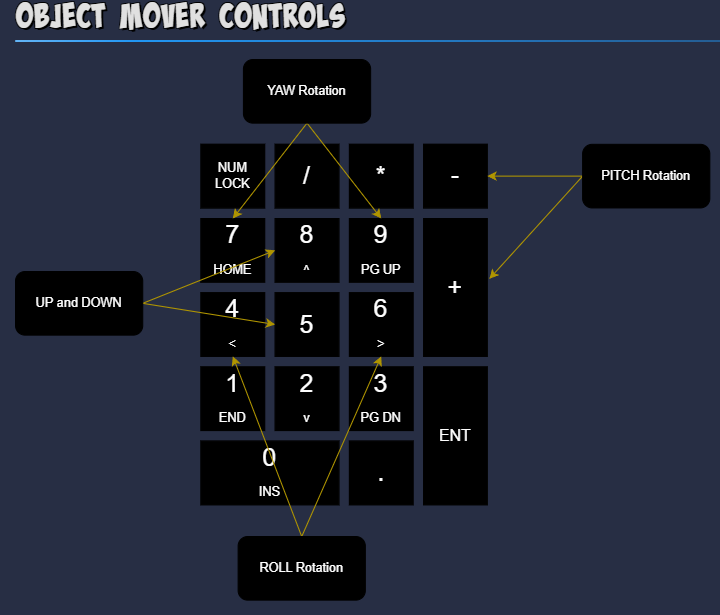
Refer to the diagram above for a visual guide to the number pad controls.
Object Mover Example